

We had seen the QTP/UFT integration & triggering QTP test scripts remotely using Jenkins in this article. (If you have not read that, I recommend you to read the article first).
In this article we will see how to display the QTP/UFT results in the Jenkins console.
I have more than 5000 automated test scripts which need to be executed very often remotely which takes more than 8 hours to execute. When I first used Jenkins to run my QTP test scripts in the remote slave machines, I had to wait for several hours to see the results. It was very annoying.
The setup was given below.
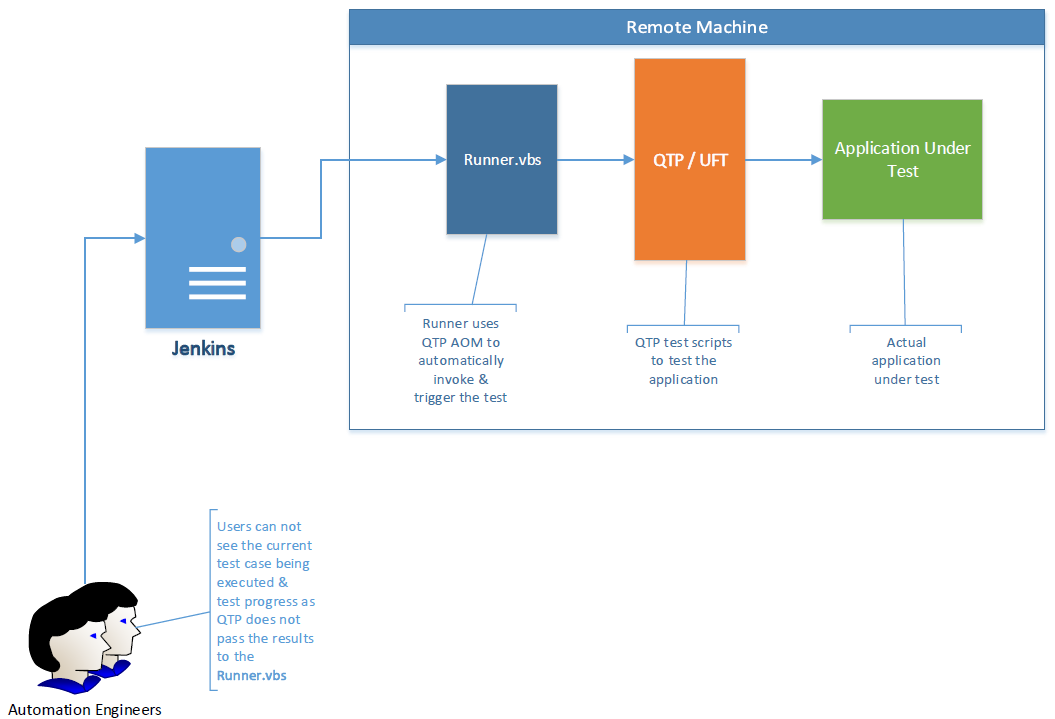
Solution:
- Runner.vbs uses QTP’s Automation Object Model (COM API) to launch, open the test & run..etc.
- Runner.vbs once launches QTP, QTP runs as a separate process -information is not exchanged between Runner.vbs & QTP.
- As Runner.vbs uses QTP’s COM API, it can access QTP’s Environment object using which the information can be exchanged.
Updated Runner.vbs:
We will modify the Runner.vbs slightly to display the results in the console.
'Create QTP object
Set QTP = CreateObject("QuickTest.Application")
QTP.Launch
QTP.Visible = TRUE

'Open QTP Test
QTP.Open "QTP Test Path", TRUE 'Set the QTP test path

'Create Environment Variables to pass the results from QTP to runner.vbs
QTP.Test.Environment.Value("JenkinsFlag") = "N"
QTP.Test.Environment.Value("JenkinsTestCaseDescription") = ""
QTP.Test.Environment.Value("JenkinsTestCaseResult") = ""

'Set Result location
Set qtpResultsOpt = CreateObject("QuickTest.RunResultsOptions")
qtpResultsOpt.ResultsLocation = "Result path" 'Set the results location

'Run QTP test
QTP.Test.Run qtpResultsOpt, FALSE

'Write the result in the console
While QTP.Test.isRunning
	If QTP.Test.Environment.Value("JenkinsFlag") = "Y" Then
		QTP.Test.Environment.Value("JenkinsFlag") = "N"

		' Show TC ID and Description
		WScript.StdOut.WriteLine QTP.Test.Environment.Value("JenkinsTestCaseNumber") & " : " & QTP.Test.Environment.Value("JenkinsTestCaseDescription") & " : "

		'Wait till the test is executed & result is updated
		While (QTP.Test.Environment.Value("JenkinsTestCaseResult") = "" AND QTP.Test.isRunning)
				WScript.Sleep 1000
		Wend

		'Show the Result
		WScript.StdOut.Write QTP.Test.Environment.Value("JenkinsTestCaseResult")
	End If
	WScript.Sleep 1000
Wend

'Close QTP
QTP.Test.Close
QTP.Quit
Changes to be done in QTP:
We will also need to do some changes in QTP’s test to set those Environment variables.
Whenever the test starts – set these variables.
JenkinsFlag is used to tell jenkins that a new testcase starts.
JenkinsTestCaseDescription is used for the test case description.
Environment.Value("JenkinsFlag") = "Y"
Environment.Value("JenkinsTestCaseDescription") = "Verify Google search results"
Runner.vbs will look for these variables continuously. As soon as JenkinsFlag is set to Y, it will display the testcase description in the console which user can see in Jenkins.
At the end of the test, update the result as given below.
Environment.Value("JenkinsTestCaseResult") = "PASS"I am just giving you an idea here – I do not update this for each & every testcase. It is all part of my framework.
Jenkins Console:
Our Runner.vbs is modified to show the results & as given below – I do not have to wait to see the results anymore – as and when it executes, i will get the results immediately by accessing Jenkins job’s console.

Summary:
This post gives only a very high level idea about the implementation. Check the below article for more details and the scripts to download.
Github / SVN integration for UFT scripts
Happy Testing 🙂
